
Classic Strategy Fun for Quick Breaks ..
I first played Desktop Tower Defense many years ago, and as a fan of Command & Conquer–style strategy games, this one immediately grabbed me. It’s a simple game, but it’s fun, quick, and perfect for taking a break. The strategy of placing towers and watching creeps try to find a way through your maze never gets old. Oldie, but definitely a goodie for the desktop. Comparable to minesweeper but way more fun.
About Desktop Tower Defense
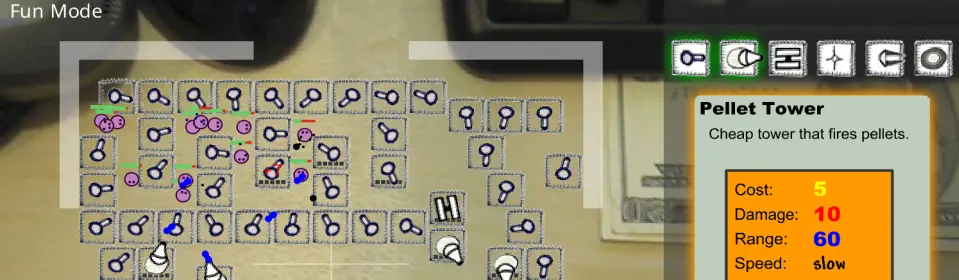
Released in 2007 by Paul Preece, Desktop Tower Defense became a fan favorite thanks to its clever combination of puzzle-like path design and tower defense gameplay. Players place towers on an office-desktop-style map to stop waves of “creeps” from reaching the goal. Unlike other tower defense games, creeps don’t follow a fixed path; your maze determines their route, giving the game a strategic twist that’s simple yet addictive. The clean design, intuitive interface, and replayable levels make it timeless for both casual and hardcore players.
Desktop-Only Note:
*Important: Desktop Tower Defense was designed for playing on a desktop or laptop. You will get the best game-play experience using either of those. However, most mobile devices may have limited functionality or display issues because the original game relied on Flash-based mechanics. Don’t ask me about playing this on a tablet. I am a mouse and keyboard sort-of-guy, ya, know?
Where to Play Desktop Tower Defense Today
Although the original version isn’t officially available anymore due to Adobe Flash being discontinued, you can still enjoy the game through Flash emulators or archived platforms like Flashpoint.
You can play Desktop Tower Defense for Free on CrazyGames, which hosts an emulator version along with other classic tower defense titles. It’s an easy way to jump back into the action and relive that old-school strategy fun.
Game Overview
Your goal is straightforward: prevent waves of creeps from reaching the exit. As you place towers, the path twists and turns, forcing you to adapt to new creep types like fast movers, flyers, or those immune to certain attacks. Upgrade towers, experiment with different layouts, and tackle three difficulty levels to keep the gameplay fresh. Even after years of playing, I still find new ways to challenge myself.
How to Play Desktop Tower Defense
First, go to this link to load the game. Unfortunately they do not offer a way to legally embed the game here on our page. Play Desktop Tower Defense for Free
From Desktop/Laptop Link Above – Click Play Now and let it load. Select Easy Mode. Select Pellet Tower from the upper right-side weapons menu. Then select a location on the defense grid to place your weapons.
You can select any of the weapons available with enough Gold Credits. After you use your credits Press Start to begin the game.
You will hear The Creeps say, Let’s Go! when the game starts. The Creeps will come from the left and will want to find the direct nearest exit path to the right. Your task is to stop them from exiting and escaping. If you let The Creeps escape, they will say Yippie!
The more enemies you destroy, the more Gold Credits you will receive to upgrade your weapons or buy more.
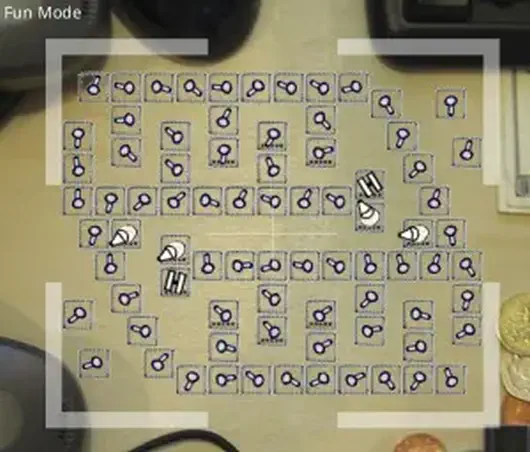
Hint: It’s All About the Defense Grid
Mastering the defense grid is key. I’ve spent countless hours testing different strategies, and even my strongest layouts get challenged by tougher waves! Here’s one of my favorite maps that maximizes the creeps’ travel time across the field. Enemies travel the longest possible path to give your towers the most time to attack.
Why Desktop Tower Defense Still Resonates
Even with its simple design, Desktop Tower Defense has deep strategic elements that keep players coming back. Its non-linear tower placement allows for creative defense strategies, making every game feel different. Whether I’m testing a new layout or tweaking my favorite map, the game offers endless opportunities to challenge yourself—and a perfect little escape after or during the day at the desk-top.
Sequels: Desktop Tower Defense 1.5 and Beyond
In 2010, Desktop Tower Defense 1.5 was released, improving on the original with new tower types, creep behaviors, and updated graphics. It retained the classic maze-building gameplay while offering extra challenges for experienced players.
Another sequel, Desktop Defender, came out as a Facebook app, though it’s harder to find now. Despite this, the original Desktop Tower Defense remains the most beloved version, and it’s still widely played by fans who love simple, strategic, and quick-to-play games.
Classic Browser Games Worth Remembering
Desktop Tower Defense is a perfect example of what made early browser games so memorable. No downloads, no microtransactions — just load it up and enjoy the challenge!